Scheduling a gym demo: how to get the most out of a software demonstration
Want to schedule a gym demo? Get a checklist of critical questions to choose the right software and save up to 15 hours a week on admin.
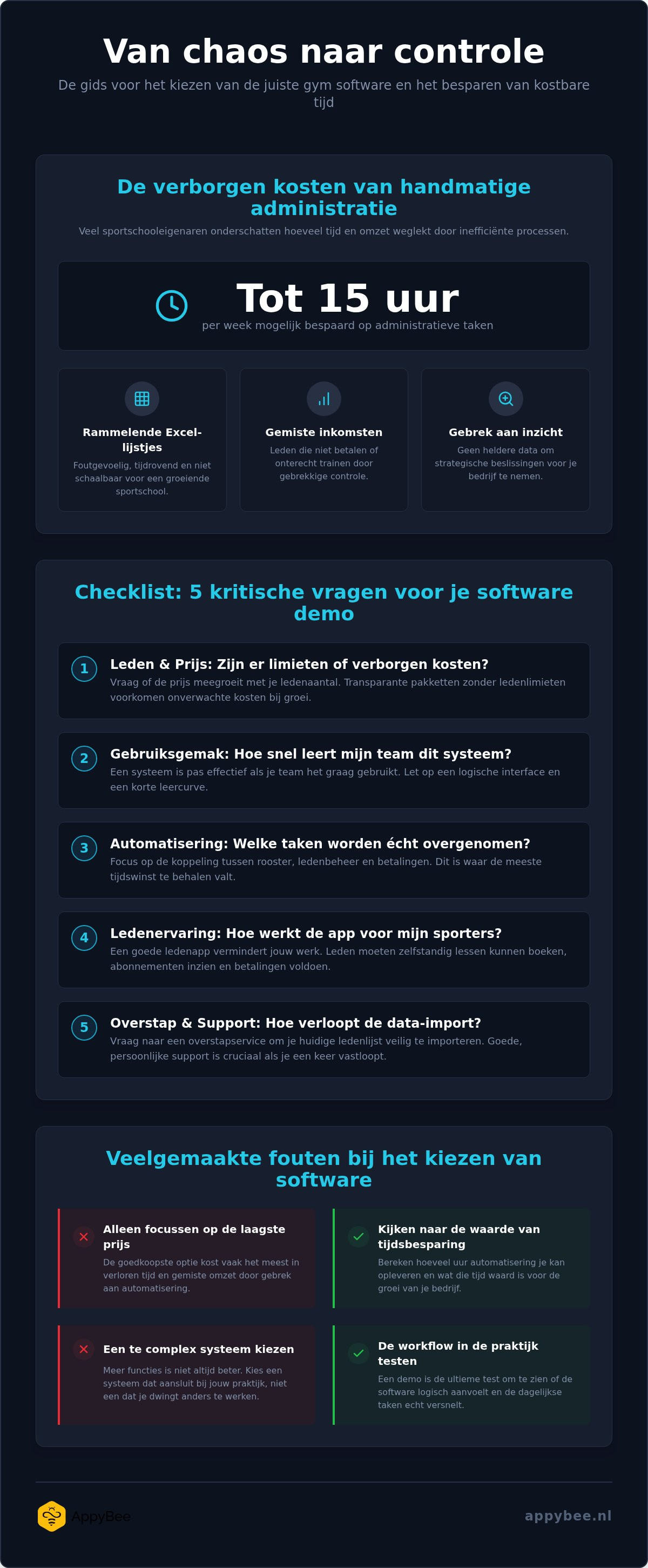
How many hours did you lose this week to clunky Excel sheets or members quietly skipping payments due to poor admin? Scheduling a gym demo might feel like just another to-do, but don't view it as a standard sales pitch. It's the ultimate stress test for your current chaos and the first step toward a gym that's finally focused on sports again instead of time-consuming paperwork.
We understand the hurdle to switch is high, as you're already busy enough with your classes and members. You want the certainty that a new system pays for itself and that your athletes effortlessly find their way in a modern app. It's all about regaining control of your business without needing to be a tech expert to keep everything running.
In this article, you'll discover how to ask the right questions during a demo to find the perfect software for your gym. We'll show you how to critically evaluate features and how smart automation can help you save up to 15 hours of admin each week. That's how you turn a simple demonstration into the start of a more efficient future for your gym.
Key Takeaways
• Learn why a demo is essential to see if the software truly matches your daily routine on the mat and how to avoid an overly complex system.
• Discover how scheduling a personal gym demo gives you immediate insight into solving your administrative bottlenecks and automating your class schedule.
• Get a practical checklist of critical questions about member limits and the learning curve, so you know the exact impact on your team and members.
• Avoid common mistakes by looking beyond just the price and focusing on the time smart automation can save you in practice.
• See how you can lay the foundation for an automated gym within 30 minutes and test the system free for 14 days at your own pace.
Why scheduling a gym demo is the first step to less admin
Looking at a list of features on a website is one thing, but seeing how those features work together in practice is a whole different story. Scheduling a gym demo is the only way to test whether the software's workflow truly fits your daily routine on the mat. After all, you don't want to end up with a system that can do everything on paper, but is so cumbersome in practice that your trainers prefer to ignore it. Gym software is essentially a specialized form of Customer Relationship Management (CRM), where it's all about smoothly managing the relationship with your members.
During a demonstration, you immediately discover where the real gains lie. Perhaps you're currently losing hours manually matching payments to memberships, or you're constantly messaging members about their punch passes. By scheduling a gym demo, you get the chance to present these specific bottlenecks to an expert. It prevents you from investing in an overly complex system that slows your growth rather than accelerates it. Plus, you get to know the people behind the software right away. You want to know whether you're choosing a partner who genuinely helps when you have a question, or if you're just a number in a database.
The hidden costs of manual administration
Many gym owners underestimate how much time leaks away each week in small tasks. How many hours do you spend checking whether everyone has paid? Keeping track of punch passes on paper or in Excel is asking for mistakes. Members working out for free unnoticed or administrative oversights simply cost you revenue. Without an automated system, you lack the insight into your numbers needed to make smart choices for your business's future. A good system helps plug these leaks by automating processes.
What a good demonstration tells you about the software
A demonstration lets you see the interface through the eyes of your members and your team. You see how quickly you can register a new member and immediately activate QR access, without needing three different screens. Pay close attention to ease of use during the session: does it feel intuitive? A good demo shows how automation works specifically for your type of gym, whether you run a martial arts school with punch passes or a fitness studio with recurring memberships. You can immediately see whether the software speaks the language of your industry. Curious what this looks like in practice? You can directly request a demo to experience it for yourself.
What to expect during a personal AppyBee demo
Scheduling a personal gym demo with AppyBee isn't a standard pitch where we simply tick off a list of features. It's an interactive session where we zoom in directly on your biggest administrative bottlenecks. Maybe you're struggling with members who forget to pay, or you're done with manually tracking punch passes in a notebook. We'll show you live how the link between the online class schedule and automated payments works. When a member books a class, the system immediately checks whether there's a valid membership or enough credits on the punch pass. That avoids discussions at the door about expired credits.
During the conversation, we also take an in-depth look at the member app. This is where your athletes will book their classes, view their memberships, and handle outstanding payments themselves from now on. The goal is for you to spend far less time on messages and emails about schedule changes or payment questions. We also explain exactly how our switching service works. We know the fear of data loss is real, but we show you how we import your existing member list safely and accurately. Scheduling a gym demo gives you the peace of mind that switching to a new system will run smoothly without disrupting your members.
Step by step through the platform
We start with the basics: setting up memberships and punch passes that seamlessly match your specific offer. Whether you work with unlimited fitness, punch passes for martial arts, or specific courses, we configure it together in the software. A popular feature is the QR access control. We show you how this works for a reception-free gym, where members simply scan their app to open the door or turnstile. We also look at retention by setting up automated reminders for members who haven't visited in a while. This keeps you in control of your member base without having to sift through lists manually every week.
The switch: from chaos to control
The biggest hurdle for many entrepreneurs is transitioning from their current workflow to new software. At AppyBee, we make this process completely transparent. We discuss how we securely transfer your existing data into our system, so you don't have to start entering everything from scratch. The integration with payment systems like iDEAL is also covered in detail. This ensures invoicing and direct debits practically run themselves, minimizing the risk of non-payers. Want to know what this means for your schedule at the end of the day? Read more about gym member administration software and how it can help you win back time each week for what you truly enjoy: teaching.
Want to experience for yourself how easy this works for your studio? You can schedule your personal demo today to see what is possible.
Checklist: the most important questions for your software comparison
Scheduling a gym demo is the ideal opportunity to take control and discover exactly whether a system will work for you. Many business owners get swayed during a presentation by the flashy features of the member app, but forget to ask about daily practice. To avoid running into walls after three months, you need to ask critical questions that go beyond just the interface. It's about software supporting your growth instead of limiting you with unexpected costs or complicated processes.
Use the following questions as a guide during your conversation:
Is there a limit on the number of members?
Some providers charge you more as soon as you grow successfully and sign up more members. At AppyBee, we don't use member limits within our packages; you pay for the features you use, not for your success.
How quickly is my team up and running?
Time is scarce. Ask how many hours it takes to master the basics of the software. An intuitive system saves you hours of internal training.
What does support look like during peak times?
Your gym doesn't close on Friday at 5 PM. Ask how support is handled if you run into an issue with access or the schedule on a busy Saturday morning.
Questions about automation and efficiency
The biggest win from good software lies in automating tedious tasks. So ask whether the system can automatically prepare direct debit orders for your bank. This prevents having to manually check invoices every month. Following up on defaulters is also key: how does the software handle members with overdue payments? A system that automatically sends reminders and blocks access in case of arrears can help keep your cash flow healthy. Don't forget the integration with your accounting software; a direct connection avoids duplicate data entry and mistakes.
Questions about member experience and retention
Member retention starts with convenience. Ask whether members can easily top up their punch pass via the app or take out a new membership without your intervention. This not only boosts revenue, but also satisfaction. You also want data-driven control. Ask what reports you can view to discover which members are training less often. With this insight, you can proactively reach out before they cancel their membership. For a deeper dive into the differences between systems, you can also compare membership management software to see where the biggest wins lie for your specific situation. After all, scheduling a gym demo is just the beginning of running your business more efficiently.
Common mistakes when choosing new gym software
Choosing new software for your gym is an investment in your business's future, but in practice, things often go wrong. Many business owners are seduced by a flashy presentation or a rock-bottom price, only to discover that the system becomes a real drag in daily use. Scheduling a gym demo helps you avoid these pitfalls, provided you know what to look for. It's not just about ticking off features, but mainly about understanding how the software supports—or hinders—your specific workflow.
One of the biggest mistakes is forgetting the end user: your member. You can have the most advanced administration on the backend, but if the member app is slow or counterintuitive, you'll immediately face resistance. During a demo, always test how easy it is to book a class or top up a punch pass on a smartphone. If this can't be done in three clicks, your members will end up messaging or calling you anyway, wiping out your intended time savings.
The pitfall of the lowest price
Naturally you look at the costs, but the monthly invoice only tells half the story. Cheap software often turns out to be expensive when you still spend hours every week on manual corrections or chasing failed direct debits. A system that doesn't automate seamlessly ends up costing you more in your own time than a premium solution. Also look out for unexpected extra fees per member or hidden modules you only discover later. For owners running a boutique studio, it's essential to choose a system that scales without unnecessary bloat. For more tips, read our guide on software for small gyms.
Underestimating the learning curve
What good is the best software if your team refuses to work with it? A common mistake is underestimating the time trainers need to get used to a new system. If the interface is too clunky or complex, staff quickly fall back on old habits like paper sign-up sheets or loose WhatsApp groups. That's precisely why scheduling a gym demo is so crucial for buy-in within your team. Use the demo to see how intuitive basic actions are and specifically ask about available training and onboarding. A good vendor guides you through the switch, so you don't have to reinvent the wheel while your classes keep running.
Avoid investing in a system that doesn't suit you, and discover how automation can boost your job satisfaction. Schedule a personal demo right away to see how we can tackle the chaos in your administration.
Ready for the next step? Schedule your free demo today
You now have a clear picture of what good software can do for you and which critical questions to ask to make the right choice. The step from administrative chaos to a streamlined gym is smaller than you think. Scheduling a gym demo with AppyBee takes just 30 minutes, but gives you a concrete action plan for your specific situation straight away. We don't just look at the tech, but mainly at how you can increase your work satisfaction by automating tedious tasks. What's more, after the demo you get the chance to test everything for 14 days free of charge and without any obligation, at your own pace.
By choosing a smart system, you join the growing group of Dutch gym owners who have taken back control of their business. It's about regaining time for your passion: helping your members achieve their fitness goals. We'll show you how our software can help drastically reduce those 15 hours of weekly admin. No complicated contracts or vague promises, just a transparent view of your future growth potential.
Schedule your demo in three simple steps
Modernizing your admin is simpler than you might expect. First, pick a time in our online calendar that suits you best. Whether you have a quick moment between classes or prefer a quiet chat at the start of the day, you're in control. Second, we ask you to briefly tell us where you currently experience the most frustration in your daily operations. Is it manually checking payments or dealing with fully booked group classes? That way, we can tailor the conversation directly to your needs. Finally, you'll receive a confirmation and we'll prepare for an insightful conversation focused entirely on your gym.
What our clients say about making the switch
Many fitness entrepreneurs have gone before you and now enjoy the peace of mind of a system that works for them instead of the other way around. One gym owner who recently made the switch noted: "I thought the transition would take months and was dreading it, but after the personal demo I saw right away how intuitive the system is. I now save hours every week that I can spend back on the mats." Want to hear more stories like this? Take a look at our testimonials for real-world stories from the floor. You're just one conversation away from a smarter way of working. Visit our demo page to book your session and discover what scheduling a gym demo can do for your studio.
Take control of your gym administration
Scheduling a gym demo isn't just another checkmark on your to-do list; it's the start of running your business more efficiently. You've seen how asking the right questions and taking a critical look at automation make the difference between daily frustration and total control. By focusing on user-friendliness for both your team and your members, you lay the foundation for healthy growth without getting buried in paperwork.
With the help of Dutch experts and a system specifically designed for the fitness industry, AppyBee can help you save up to 15 hours a week on admin. No complicated transition, just personal guidance that ensures you see immediate results. Why keep struggling with clunky Excel spreadsheets when the solution is well within reach?
Schedule your personal demo now and discover the convenience of AppyBee. You can then test the system free for 14 days to experience for yourself how smooth an automated gym runs. It's time to shift your focus back to what truly matters: your passion for fitness and the results of your members. Take that first step toward more peace of mind and job satisfaction today.
Frequently asked questions about scheduling a demo
How long does an average gym demo take at AppyBee?
A personal demonstration takes an average of 30 minutes. We don't waste time on generic sales pitches, but dive straight into the features relevant to your specific studio. In this half hour, we show you how to automate your admin and how the member app works. You can schedule your gym demo at a time that suits you best, fitting neatly between your training sessions. After thirty minutes, you'll have a clear view of the possibilities.
Do I already need to have all my member data on hand for the demo?
No, you don't need complete member lists or financial overviews ready for your first intro. It’s mostly helpful if you have a general idea of your current workflow and your biggest administrative pain points. During the session, we'll explore the platform's general features. Only when you decide to switch will we personally assist you with securely importing all your existing data from Excel or other systems.
Is the AppyBee demo really free and without obligation?
Yes, the demo is completely free and with no strings attached. We believe you should experience the value of a smart system yourself without getting an invoice right away. It's an introductory chat to see if there's a match between your needs and our software. You'll get honest advice on setting up your administration, even if another solution turns out to be a better fit right now.
Can I test the software myself without a demo?
Certainly, you can immediately start a 14-day free trial to discover the features yourself. Still, we recommend scheduling a gym demo first, as we can quickly show you the smartest settings. A brief walkthrough saves you hours of searching for the right buttons. After the demo, your trial account will be ready to go, giving you a head start on testing.
What do I need to attend the demo online?
All you need is a computer or laptop with a stable internet connection to join the online demo. The session takes place via a video call where we share our screen with you. You don't need to install any complicated software; a single click on the link in your confirmation email is all it takes. This accessibility is typical of modern web apps; just like this demo, you can nowadays also start multiplayer games like Steer It directly in your browser for a moment of relaxation. It helps if you're in a quiet place, so we can walk through your future dashboard and the various settings undisturbed.
Will my specific questions about martial arts also be covered?
Absolutely, we have extensive experience with martial arts schools and the software is tailored specifically to them. We discuss features like punch card management, different membership tiers, and handling class passes. Because we speak the language of the dojo, we know exactly why standard gym software often falls short for your school. We'll show you how to easily automate these specific processes without costing you extra time.
Can I also see the access control hardware during the demo?
Yes, during the session we explain in detail how the integrated QR access control works in practice. We'll show how the software communicates with the hardware at your gym's door or turnstile. You'll see live how a member scans their app and how the system checks for a valid membership within a fraction of a second. This gives you a clear picture of how to run a reception-free gym.
What happens after I attend the demo?
After the session, you'll immediately receive the login details for your personal trial environment. You can then test all features at your own pace with your own data for 14 days. Our Dutch experts will remain available for all your questions during this trial period. We'll also send you a clear summary of what we discussed along with a proposal tailored to the size of your gym. Afterwards, you decide whether to make the final switch.

Date
August 20, 2026
Do you like this article?
Why not share it: